
A token machine is a black box. Staff know the tokens went in and the books came out, and not much else. The School Portal dashboard answers the questions a principal, a librarian and a funder ask: how many books went out, to which grades, which titles children actually chose, and what needs refilling.
This page is part of the book vending machine for schools guide.
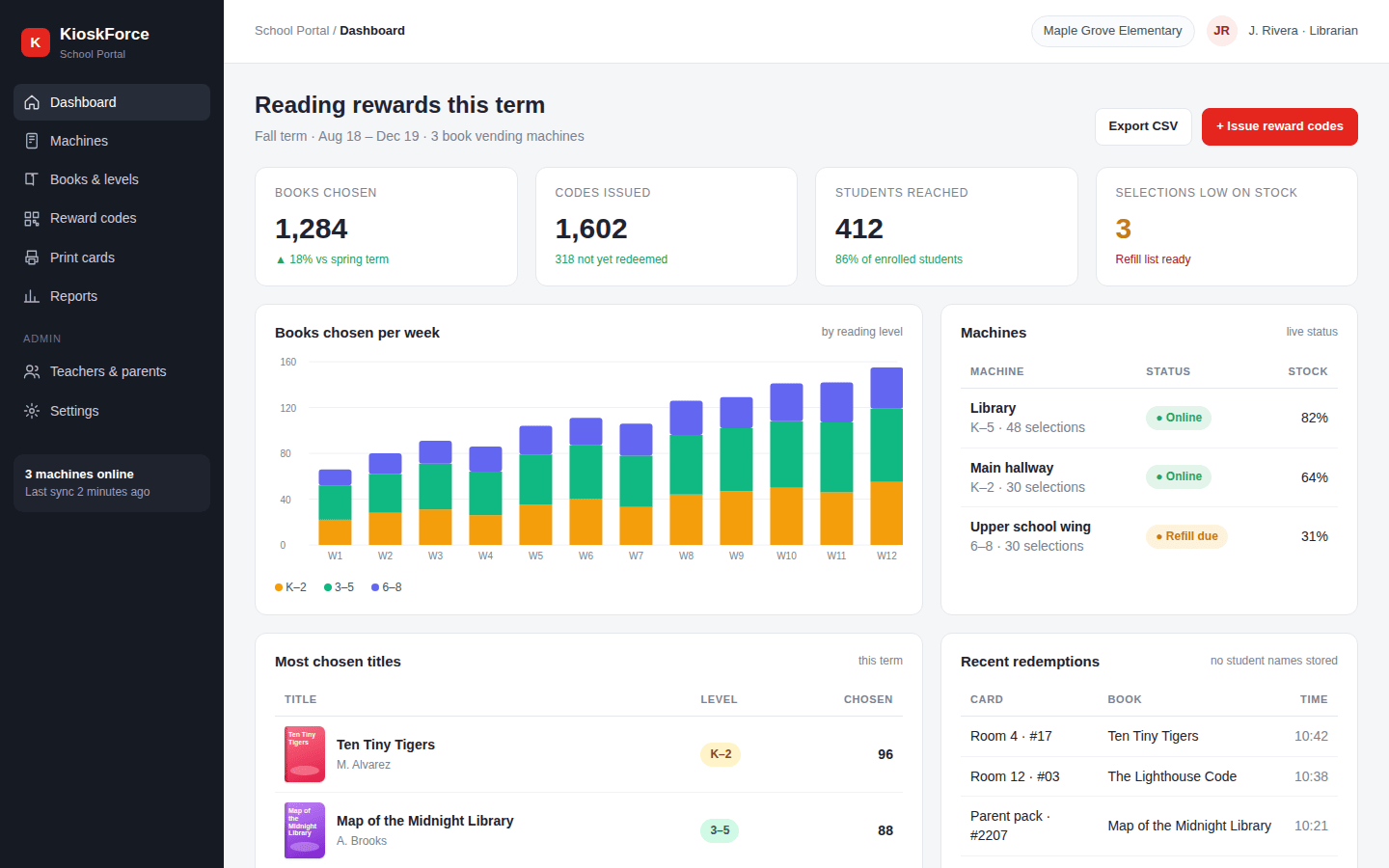
What’s on the dashboard
| Panel | What it answers |
|---|---|
| Books chosen | How many books went out this term, against last term |
| Codes issued | How many reward codes exist and how many are still unredeemed |
| Students reached | How many cards were redeemed, as a share of enrolment |
| Books per week by level | Whether K–2, 3–5 and 6–8 are all being served, week by week |
| Machines | Online status and stock per machine |
| Most chosen titles | What children actually pick, to guide the next order |
| Recent redemptions | Class, card, title and time, with no student names |
| Low on stock | Selections to refill before a class arrives |
Refills
Stock is tracked per selection. When a selection runs low, the dashboard flags it and adds it to the refill list, grouped by machine. The books and levels screen shows each title’s stock and how often it was chosen, so library staff reorder what sells and drop what doesn’t.
Budget control
The number of codes in circulation sets the book budget. A school that hands out 30 cards a week across a 36-week year gives away about 1,080 books. The dashboard shows codes outstanding at any time, so staff can slow down printing before the book money runs out, or ask parents to top up.
Reports for funders
Grants and PTA funds usually come with a question: what did it achieve? The term report gives books chosen, students reached as a share of enrolment, books by level and the most chosen titles. Export to CSV or print for a board meeting.
Remote settings
Titles, covers, prices and levels are changed from the portal, not at the machine. The same remote configuration KioskForce machines use for product and screen settings applies; see VoTi remote settings.
Frequently asked questions
What reports does a school book vending machine give?
In the KioskForce School Portal: books chosen per week by reading level, codes issued and outstanding, students reached, machine status and stock, top titles, recent redemptions by class and card, and a refill list. Everything exports to CSV.
How do library staff know when to refill the machine?
Stock is tracked per selection. The dashboard flags selections that are low or sold out, and the refill list shows what to bring to which machine. A machine that needs a refill is marked on the dashboard.
Can the dashboard help with grant reporting?
Yes. Funders often ask how many students a program reached and how many books went out. The term report gives books chosen, students reached as a share of enrolment, books by level and the most chosen titles, ready to export.
Related
- Reading levels: stock and redemptions by level
- QR reward codes
- Printable QR reward cards
- Book vending machine for schools
- Education: other campus uses
Talk to us
Tell us how many machines you plan, how many students they serve and what your funders ask you to report. We’ll show you the reports for your setup.
Project brief · 60 seconds
What are we building together?
Three quick steps. Your brief goes straight to the engineers who design, build and support KioskForce systems.

