
Teachers already know how to hand out rewards: a sticker, a ticket, a token. Printable QR reward cards keep that routine. The teacher prints a sheet, cuts it up and hands a card to a student who met a goal. The difference is what the card can do at the machine.
This page is part of the book vending machine for schools guide.
From batch to classroom
- Create a batch. In the School Portal, choose the number of cards, the reading level, an optional book list and an expiry date.
- Download the PDF. Nine cards to a US Letter page, or A4.
- Print and cut. Plain paper is fine. Card stock or a laminator helps if students keep cards in a bag for a week.
- Hand them out when a student meets the goal: reading minutes, attendance, a positive behaviour referral.
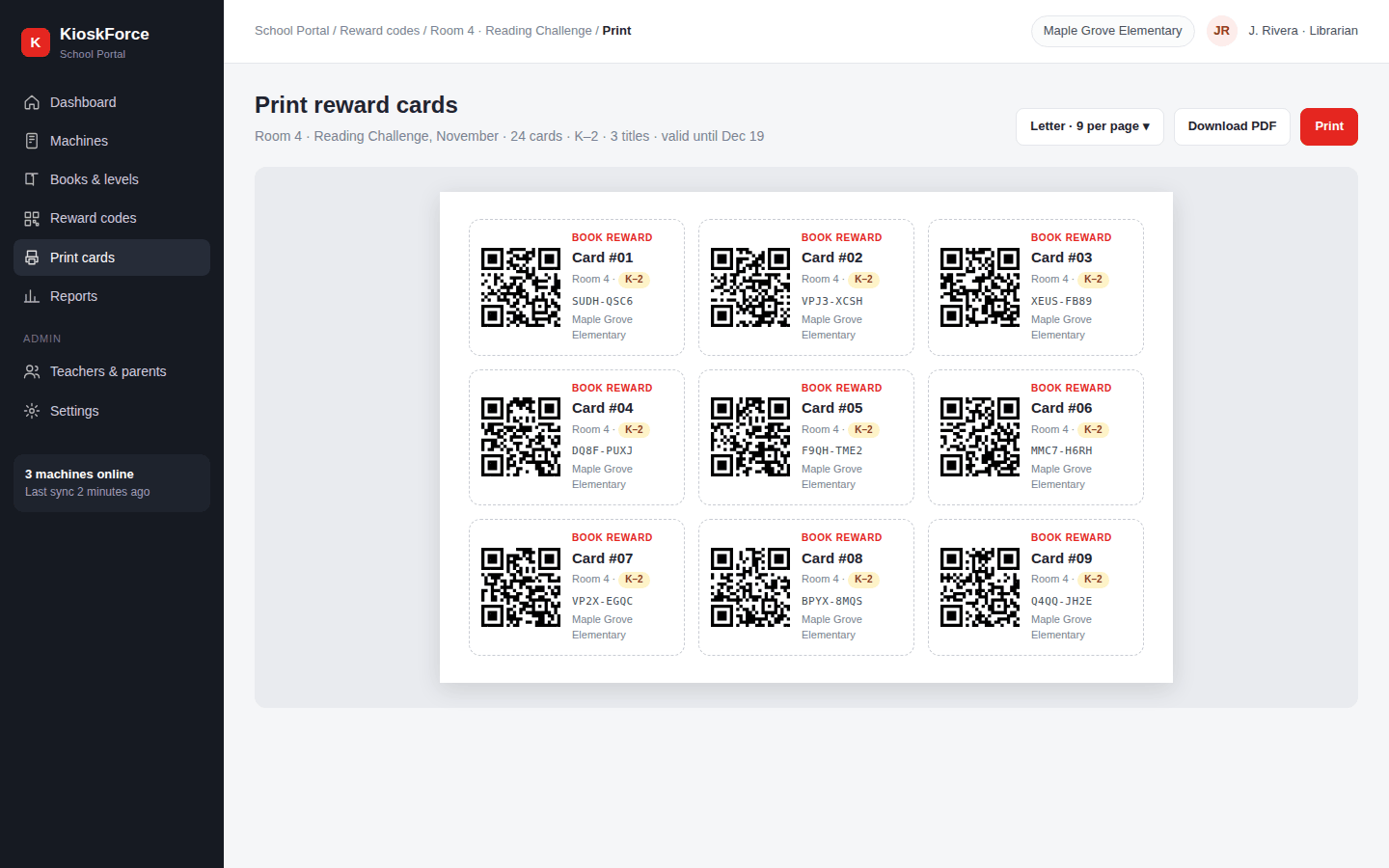
What’s on each card
| Item | Why |
|---|---|
| QR code | What the machine scans |
| Short typed code | A backup if a card is creased; the machine also takes typed codes |
| Level badge | So the teacher and the child can see which books it opens |
| Class and card number | Optional; helps the teacher track who has which card |
| School name | So a card found in a hallway goes back to the right office |
No name, photo or student ID is printed unless the school wants a label.
Lost, copied and expired cards
- Lost. Cancel the card in the portal and print a replacement. The old code is refused at the machine.
- Copied. Each code works once. A copy scanned first makes the original fail, and the redemption log shows when and where it happened.
- Expired. Cards from an old batch show “this card has expired” at the machine, so last year’s stack in a desk drawer doesn’t empty this year’s stock.
- Failed vend. If the book doesn’t drop, the card keeps its value and can be scanned again.
Cards inside a reward program
Many US schools run book vending inside their Positive Behavioral Interventions and Supports (PBIS) framework, which lists acknowledging expected behaviour among its core practices. Cards fit that pattern. Teachers decide how many to print each week, so the number of cards in circulation, not the machine, sets the book budget. The School Portal dashboard shows how many printed cards are still unredeemed.
Frequently asked questions
Can teachers print QR reward cards on a normal printer?
Yes. The School Portal produces a PDF, nine cards to a US Letter page (A4 is also available), for any office printer. Plain paper works. Card stock or lamination makes cards last longer if students carry them around.
What if a student photocopies a reward card?
Each code is single use, so a copy only works if it is scanned before the original, and then the original is refused. The redemption log shows which card was used, where and when, and the teacher can cancel a batch if copying becomes a problem.
Do the cards need student names?
No. A card can carry a card number, a class or nothing at all. The school chooses the label. Names are never required.
Related
- QR reward codes: how a code replaces a token
- Parents buy book codes online: codes on a phone instead of paper
- School Portal dashboard
- Book vending machine for schools
Talk to us
Tell us how your teachers hand out rewards today and how many cards a week you expect to print. We’ll set up batches and card labels to suit.
Project brief · 60 seconds
What are we building together?
Three quick steps. Your brief goes straight to the engineers who design, build and support KioskForce systems.

