
KioskForce vending machines give consumers full visibility into what they’re buying — before they buy it. Every product on the touchscreen includes a complete nutrition facts panel accessible with a single tap. This transforms the vending experience from a blind purchase into an informed decision.
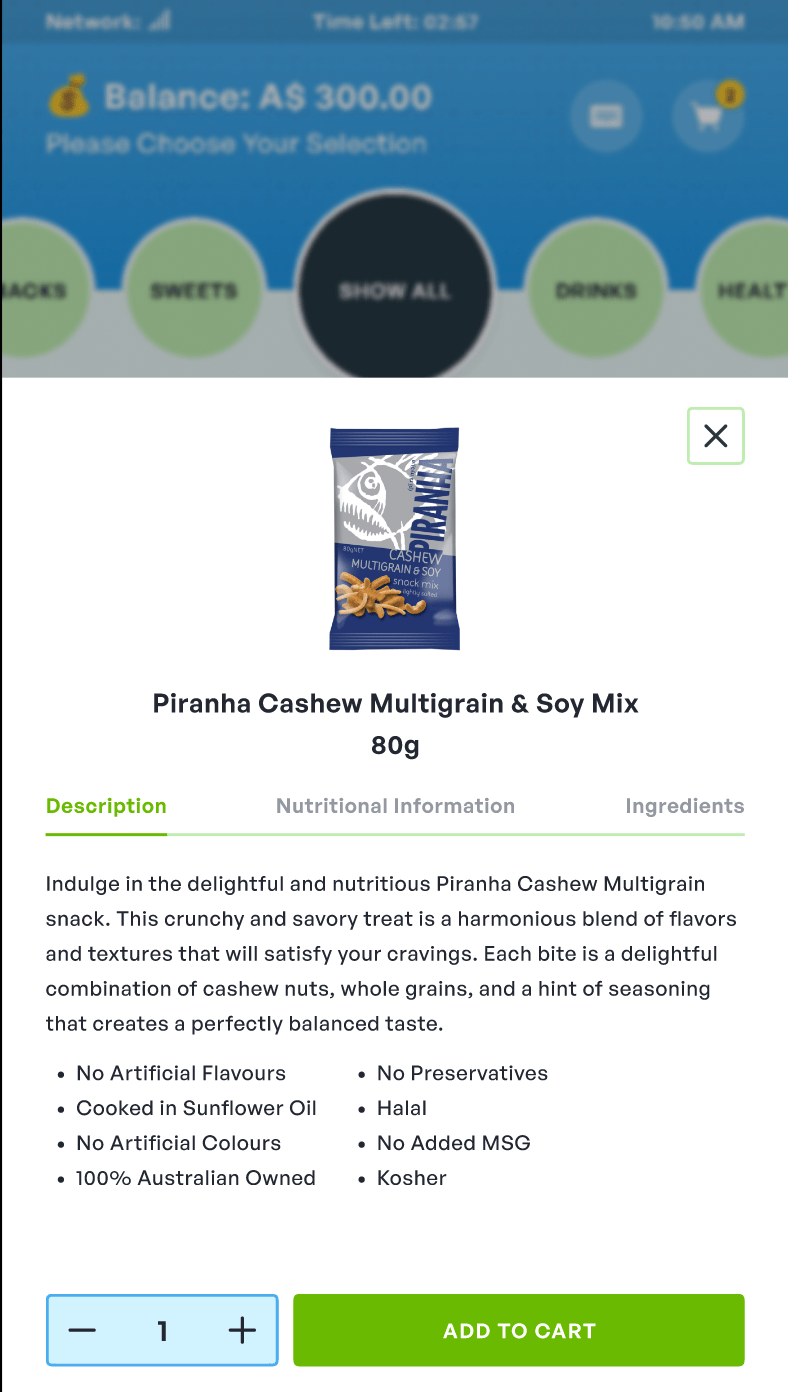
What Consumers See
When browsing products on a KioskForce touchscreen vending machine, each item displays a nutrition icon alongside its image and price. Tapping the product opens a nutrition facts panel that shows:
| Nutrient | Displayed |
|---|---|
| Calories (Energy) | ✓ |
| Total Fat | ✓ |
| Saturated Fat | ✓ |
| Sodium | ✓ |
| Total Carbohydrates | ✓ |
| Dietary Fiber | ✓ |
| Total Sugars | ✓ |
| Added Sugars | ✓ |
| Protein | ✓ |
| Allergen Information | Configurable |
| Ingredient List | Configurable |
After reviewing nutrition values, the consumer can either add the item to their cart with one tap, or close the panel to continue browsing. The interaction is designed to be fast — typically under 3 seconds from tap to decision.
How It Works — Operator’s View
Nutrition data is managed through the VoTi cloud management platform. Operators upload product information once, and it synchronizes to all connected machines:
- Upload nutrition data — CSV import or manual entry per product SKU in the VoTi dashboard
- Assign to planogram slots — each coil/tray position links to a product with its full nutrition profile
- Machines sync automatically — changes propagate to all connected machines
- Consumers view on-screen — nutrition panel renders on the touchscreen at the point of purchase
Regulatory Compliance — FDA, FSANZ, and Beyond
United States: FDA Vending Machine Calorie Labeling
The FDA’s vending machine calorie labeling rule (21 CFR 101.8) requires calorie disclosure at the point of purchase for operators with 20 or more vending machines. KioskForce touchscreen machines satisfy this requirement natively:
| Compliance Method | Traditional Sticker Approach | KioskForce Digital Display |
|---|---|---|
| Calorie disclosure | Printed sticker on machine front or product | On-screen before purchase |
| Update process | Physically re-label each machine | Update centrally, syncs to all machines |
| Data richness | Calories only (minimum) | Full nutrition facts panel |
| Product rotation | Re-label every time products change | Update in dashboard, no site visit |
| Audit trail | Manual records | VoTi dashboard logs all updates |
Australia & New Zealand: FSANZ Health Star Rating
For operators in Australia and New Zealand, KioskForce machines can display the Health Star Rating system alongside standard nutrition data. The HSR (0.5 to 5 stars) gives consumers an at-a-glance nutritional summary that aligns with FSANZ voluntary front-of-pack labeling guidelines.
European Union: FIC Regulation 1169/2011
EU operators can configure the nutrition panel to display values per 100g or per 100ml, with the mandatory EU format including energy, fat, saturates, carbohydrate, sugars, protein, and salt — matching the FIC Regulation requirements.
Why Nutrition Information Matters for Vending Operators
Consumers Make Healthier Choices
The strongest recent evidence is a 13-month randomized trial of 267 vending machines (150 beverage, 117 snack) on Philadelphia government property, published in JAMA Network Open in 2024. It compared four messages against each other:
- Compared with a beverage-tax poster, traffic-light labels reduced monthly sales of unhealthy beverages by 30%, and physical-activity calorie-equivalent labels (minutes of walking needed to burn the item off) by 34%.
- Traffic-light labels lowered calories per customer trip (147 vs 178 kcal, compared with physical-activity labels).
- Monthly dollar sales did not fall significantly in the main analysis, although one sensitivity analysis found lower revenue with physical-activity labels.
- Snack machines showed very few significant differences. The effect was mainly on drinks.
Label design and product mix decide how much changes, so read these as evidence that labelling can shift choices, not as a forecast for a specific machine.
Attract Health-Conscious Locations
Sites with wellness mandates — corporate campuses with employee wellness programs, universities with healthy campus initiatives, hospitals, and government buildings — increasingly require vending machines that support nutrition transparency. A touchscreen machine can show calories and nutrition per item on screen. Tell us which standard or label format your site requires, and we confirm it on the quotation.
Future-Proof Against Expanding Regulations
Food labeling regulations continue to evolve globally. In the US, the FDA’s vending machine labeling rule (21 CFR 101.8) requires operators of 20 or more machines to disclose calories for items whose front-of-pack calories aren’t visible at the point of purchase. England’s out-of-home calorie labelling regulations (in force since April 2022, for businesses with 250 or more employees) apply to non-prepacked food ready to eat; they don’t mention vending, so check with your local authority whether any of your lines are in scope. A digital nutrition display means your machines stay compliant without hardware changes — only data updates are needed.
Vending Machine Models With Nutrition Display
Nutrition information display is available on all KioskForce touchscreen vending machines:
| Model | Screen Size | Best For |
|---|---|---|
| KF10X22 | 22-inch | Large nutrition panel + advertising space. Ideal for locations where nutritional transparency is a procurement requirement |
| KF6X10 | 10-inch | Compact spaces. Nutrition icon + tap-to-view panel. Space-efficient while maintaining full compliance |
| Custom configurations | Variable | Any screen size can be configured for nutrition display |
Get Started
Tell us about your location and nutrition labeling obligations, and we’ll confirm which model and screen configuration fits.
Project brief · 60 seconds
What are we building together?
Three quick steps. Your brief goes straight to the engineers who design, build and support KioskForce systems.

