
A book vending machine in a K–8 school has a problem a snack machine doesn’t: the same cabinet serves a five-year-old and a thirteen-year-old. Without levels, a token buys any book, and the picture books go to whoever reaches them first. Reading levels solve this in software, so one machine can serve every grade.
This page is part of the book vending machine for schools guide.
How reading levels work
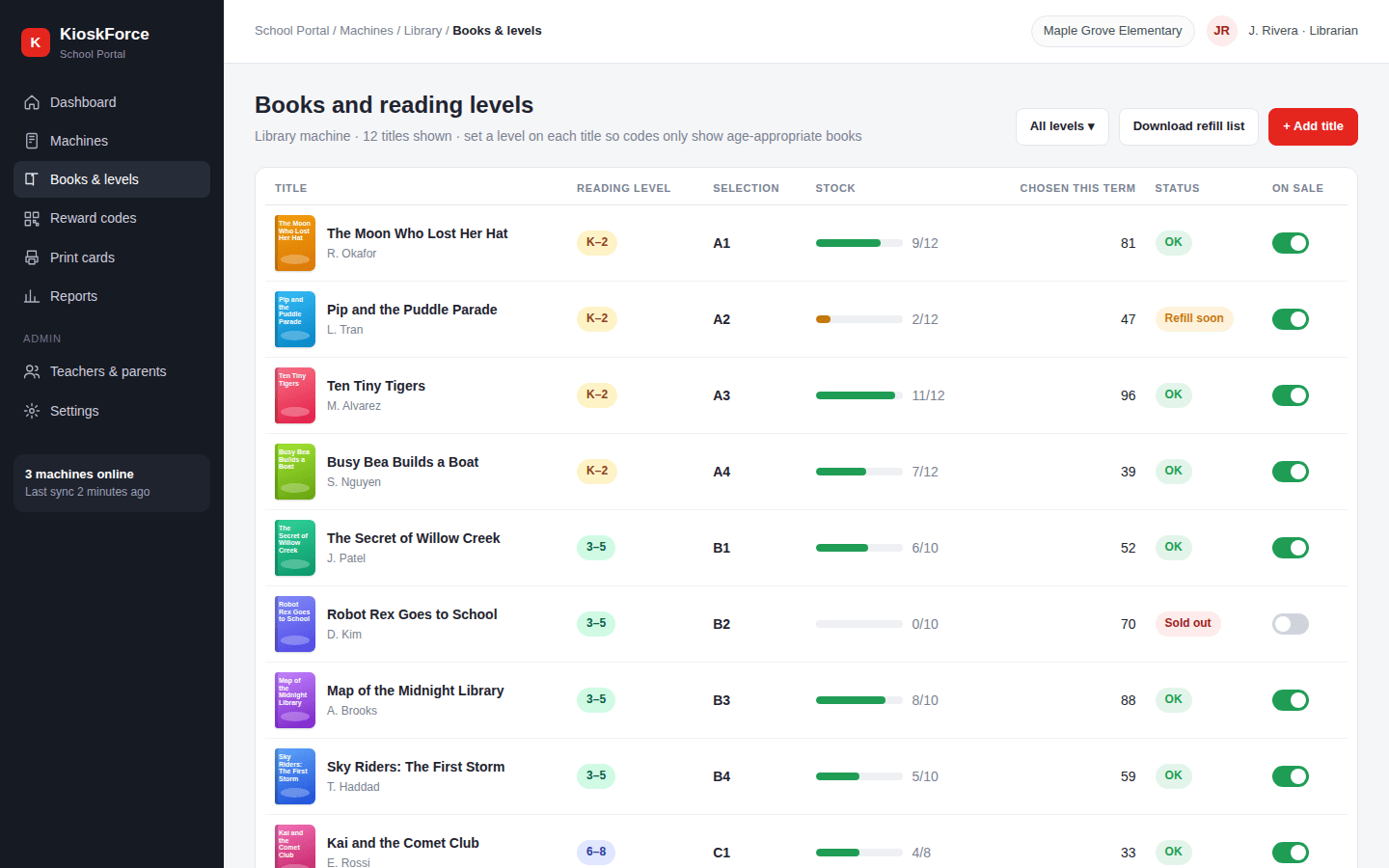
- Library staff tag each title. In the School Portal, every book in the machine gets one or more levels. The default bands are K–2, 3–5, 6–8 and 9–12.
- Each reward code carries a level. When a teacher issues codes, they choose the level, or several levels, or “any level”.
- The machine filters. When a student scans a card, the screen shows only books that match the card’s level and are in stock in that machine.
Choosing a levelling scheme
| Scheme | Good for | Notes |
|---|---|---|
| Grade bands (K–2, 3–5, 6–8) | Most elementary and K–8 schools | The default. Easy for teachers and parents to understand |
| Your library’s levels | Schools that already level their collection | Rename the bands or add levels to match the scheme your library uses |
| Interest groups | Mixed-age programs | Levels don’t have to be ages: “graphic novels” or “Spanish” work too |
| One level | A machine in a K–2 wing | Every code gets the same level, so nothing changes for students |
A title can sit in two levels when it suits both, such as an early chapter book for strong second graders and for third graders.
Levels and the machine itself
Software decides what a child sees. The cabinet decides what fits and what the child can reach:
- Group levels by selection. Put K–2 picture books in the selections nearest the floor, and chapter books higher up. The US Access Board’s advisory reach range for ages 5 to 8 is 18 to 40 inches, against 16 to 44 inches for ages 9 to 12.
- Size selections to the books. Thin picture books and thick novels need different coil pitches or trays. Send us the dimensions, and the schools guide covers sizing.
- Watch stock by level. Stock is tracked per selection, so the School Portal dashboard shows which level is running low before a class arrives with a stack of K–2 cards.
Frequently asked questions
Can one book vending machine serve K–8?
Yes, if each title carries a reading level and each reward code carries one too. The machine then shows each student only the books at their level. Physical sizing still applies: picture books and thick chapter books need different selection widths, and the youngest children need the screen and collection point within reach.
Which reading level scheme does the School Portal use?
Grade bands by default: K–2, 3–5, 6–8 and 9–12. A school can rename them or set up its own levels, for example to follow the levelling system its library already uses. A title can be tagged with more than one level when it suits two age groups.
What if a student wants a book above their level?
The teacher decides. A code can be issued for any level, for several levels, or for the whole machine. Some schools give advanced readers codes one band up, or use ‘any level’ codes as a special reward.
Related
- Book lists: narrow a code to titles a teacher or parent picks
- QR reward codes: how codes replace tokens
- School Portal dashboard: stock and redemptions by level
- Book vending machine for schools: cost, funding and sizing
- Specialty retail vending machines
Talk to us
Send us the grades the machine will serve and the dimensions of your thinnest and thickest books. We’ll suggest a layout by level.
Project brief · 60 seconds
What are we building together?
Three quick steps. Your brief goes straight to the engineers who design, build and support KioskForce systems.

