
Most school book vending machines run on tokens. Staff hand out a gold coin for a reading goal or a positive behaviour referral, and the student drops it into the machine. Tokens are simple, and young children like holding them. They also get lost, traded and copied, and a token tells the school nothing about who read what. A QR reward code keeps the moment that matters, the child choosing a book, and fixes the rest.
This page is part of the book vending machine for schools guide.
How a QR reward code works
- The school creates codes in the KioskForce School Portal, usually as a batch for one class, and decides what each code can buy: a reading level, a book list, which machines, and an expiry date.
- Teachers hand out cards. Codes are printed as cut-out QR cards, or bought by parents and shown on a phone.
- The student scans the card at the machine’s QR reader.
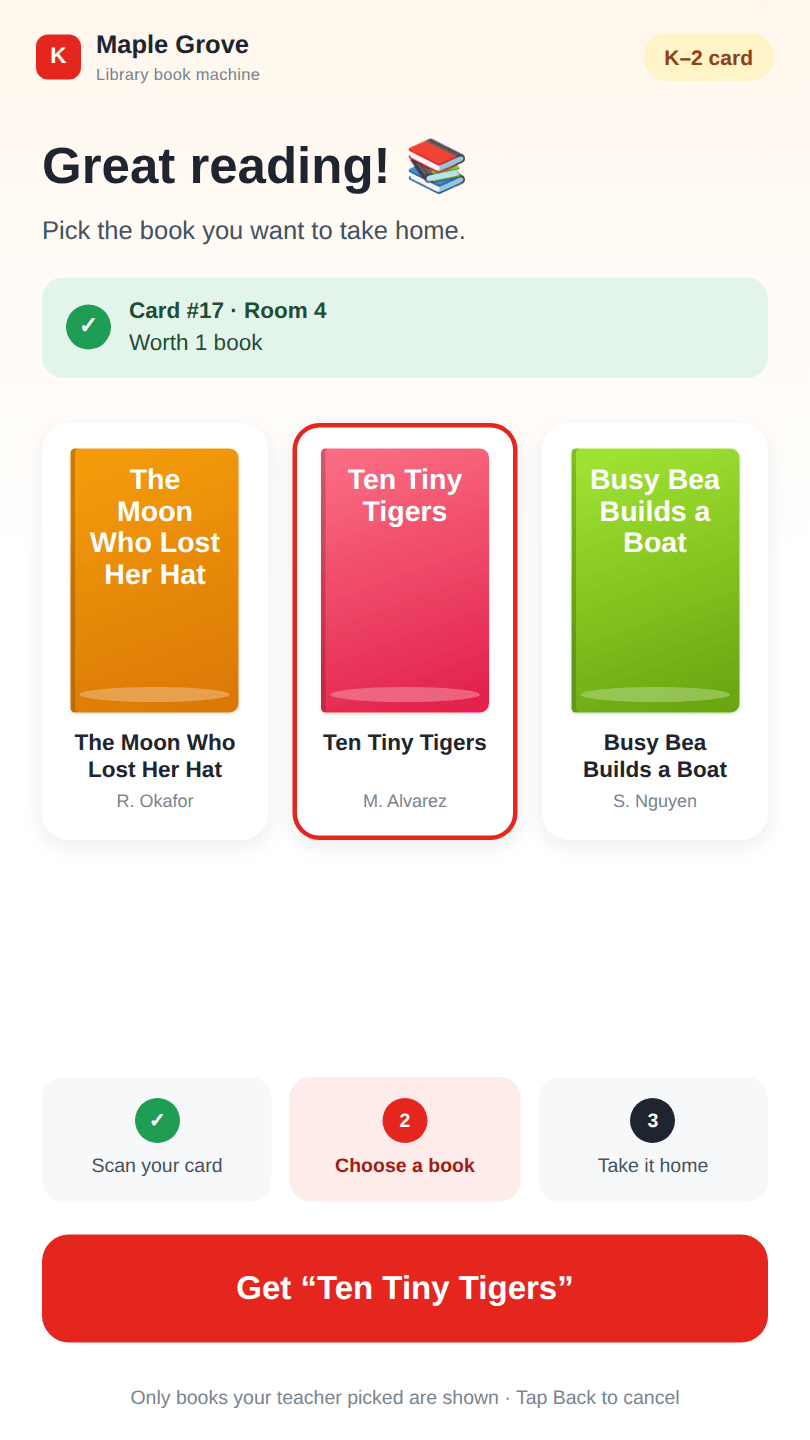
- The screen shows only the allowed books that are in stock in that machine. The student picks one, and it drops.
- The code is marked used, and the redemption appears in the School Portal dashboard.
Tokens and codes compared
| Physical token | QR reward code | |
|---|---|---|
| What the child does | Drops a coin in the slot | Holds a card to the reader |
| Limit to an age group | No: any token buys any book | Yes: one reading level per code |
| Limit to chosen titles | No | Yes: a book list per code |
| Lost or copied | Works for whoever has it | Cancelled in the portal, refused at the machine |
| Expiry | None | Optional, such as end of term |
| Record of what was chosen | None | Every redemption, by class and card |
| Parents can buy them | No | Yes, online |
| Ongoing cost | Buy more tokens | Paper and printer ink |
Neither option is wrong. A kindergarten class may keep its tokens, because a five-year-old can hold one. The machine can take both, so a school can use codes where it wants levels, parent purchases or reports.
Rules that keep codes honest
- Single use. One code, one book. A used code is refused with a clear message, so a second scan never vends.
- Failed vend, code returned. If the book does not drop, the code goes back to the card automatically and the student can try again. Nobody has to issue a replacement.
- Expiry. A batch can expire at the end of term, so codes don’t build up across years.
- Cancel and reprint. A lost card is cancelled in one click. Its replacement has a new code.
- One scan at a time. While one student is choosing, the machine ignores other cards.
Student privacy
A code does not identify a child. The portal knows a card as “Room 4, card 17”, and the school decides whether to print even that. No student name, email address or phone number is entered at the machine or in the portal. Parent accounts see only their own codes. Reports show classes, levels and titles, not children.
Frequently asked questions
Can a book vending machine use QR codes instead of tokens?
Yes. On a KioskForce school book vending machine, a printed QR reward code does the same job as a token: the student scans it, chooses a book and keeps it. A code can also carry a reading level, a book list and an expiry date, and every redemption is recorded. The machine can accept tokens at the same time.
What happens if a student loses a QR reward card?
The teacher cancels that card in the School Portal and prints a new one. A cancelled code is refused at the machine, so a found or copied card is worth nothing. A lost token, by contrast, works for whoever picks it up.
Can a student use the same code twice?
No. Each code is worth one book and is marked used as soon as the book is dispensed. If the machine fails to dispense, the code is returned to the card automatically and can be scanned again.
Do QR reward codes collect student data?
No personal data is needed. A card is identified by class and card number, such as Room 4, card 17. The school chooses whether to print any label, and no student name, email or phone number is entered at the machine or in the portal.
Related
- Book vending machine for schools: tokens, cost, funding and sizing
- Reading levels and book lists: what a code can buy
- Printable QR reward cards
- Parents buy book codes online
- School Portal dashboard and refill reports
Talk to us
Tell us how your school issues rewards today, tokens, tickets or points, and how many books a term you expect to give away. We’ll set up codes to match.
Project brief · 60 seconds
What are we building together?
Three quick steps. Your brief goes straight to the engineers who design, build and support KioskForce systems.

