
Updated 2 October 2026.
What a self-order kiosk is
A self-order kiosk (also called a self-ordering kiosk, ordering kiosk, self-serve kiosk or self order terminal) is a touchscreen terminal that lets a customer do the cashier’s job themselves: browse the menu, customise each item, pay, and send the order to the kitchen. In quick-service restaurants (QSR), fast-casual chains, cafés, food halls, stadiums and workplace canteens it runs alongside, not instead of, the counter.
The screen is the visible part. The part that decides whether a restaurant kiosk works is behind it: the kiosk ordering system has to read the live menu from the restaurant’s point-of-sale (POS) system and post each paid order back into it, so the order reaches the kitchen display (KDS) or printer exactly like a counter order. A beautiful kiosk that cannot talk to your POS is a second, disconnected till.
Customer appetite is real. In a May 2024 survey of more than 1,000 US adults, the National Restaurant Association found that 65% of limited-service customers would order their food using a self-service kiosk and 63% would use one to pay.
If you run a single restaurant on a mainstream cloud POS and simply want customers to order on a screen, read where a custom kiosk is the wrong answer first.
How a self-order kiosk works: the order flow
Every kiosk ordering system follows the same seven steps. Each one is a design decision.
- Attract and start. An idle screen shows promotions; a tap starts the order. Ask for dine-in or takeaway here if it changes price, tax or packaging.
- Menu. Categories and items with photos, prices and allergen or calorie information. The menu, prices and availability come from the POS; an item marked out of stock at the POS should disappear or grey out on the kiosk within seconds.
- Modifiers. Sizes, sides, extra toppings, “no onion”, combo upgrades. Modifier groups with minimum and maximum selections are where most POS integrations get difficult, because the kiosk must build an order the POS will accept.
- Upsell. Suggested add-ons (drink, dessert, a larger size). This is where the ticket-size claims come from, and it should be tuned, not maximised: too many prompts slow the line.
- Payment. Card, phone wallet or, in some venues, staff badge, voucher or loyalty account. Cash is possible with a note acceptor but adds hardware, cash handling and service visits.
- Order to the kitchen. The paid order is posted to the POS, which routes it to the KDS or kitchen printer and records the sale, tax and payment.
- Receipt and order number. A printed or digital receipt and an order number or name for the pickup screen, or a table number for delivery to the table.
POS and KDS integration: the part that decides the project
The kiosk does not replace the POS. It is a new ordering channel into the POS. That means:
- Your POS vendor’s API decides what is possible. Most current POS platforms publish an ordering or menu API. Some let any developer use it; others restrict it to approved partners or charge for access. Ask your POS vendor in writing whether a third-party kiosk can read the menu and post orders and payments, before you buy hardware.
- Menu sync must be automatic. If staff have to update prices in two places, the two will drift.
- Payments must reconcile. Decide whether the card payment is taken by a terminal integrated with the POS or by a separate kiosk terminal whose settlements you reconcile against POS orders.
- The KDS sees the kiosk as a channel. Kitchen staff need to know an order came from the kiosk (and whether it is dine-in or takeaway); pickup screens need the order number.
- Offline behaviour. Decide what happens if the network or the POS is down: stop taking orders, or queue them. Most operators stop, so they never take money for an order the kitchen cannot see.
Integration is project work, not a checkbox. KioskForce treats it that way: we scope the integration with your POS’s API and build it as a REST API integration for your project. We do not claim certified, off-the-shelf integrations with named POS vendors, and you should be wary of any supplier who says every POS “just works”.
Countertop vs floor-standing vs wall-mounted kiosks
| Form factor | Typical screen | Best for | Watch for |
|---|---|---|---|
| Floor-standing | Large portrait touchscreen (often 21–32 inch) | Busy QSR lobbies, food courts, stadiums | Floor space and power or data to the floor position; easiest format to make wheelchair-reachable with a low, angled screen |
| Countertop | Tablet-sized to around 22 inch | Cafés, small stores, ordering stations on an existing counter | Screen and card reader often end up above accessible reach height on a standard counter |
| Wall-mounted | Mid-size to large | Narrow sites, corridors, queue lines | Needs a structural wall, cable routing inside the wall and a mounting height that respects reach ranges |
| Kiosk with collection lockers | Ordering screen plus heated, ambient or chilled compartments | Pre-made items, click-and-collect, peak-hour pickup | Compartment sizes, cleaning access and refill workflow |
Most multi-kiosk restaurants mix types: floor units in the lobby and a countertop or wall unit near the pickup point. Specify one accessible unit at least, and make sure it offers every function the others do.
Payment: EMV, contactless and PCI
A self-order kiosk is an unattended card-present environment, which changes the payment hardware.
- Use a terminal approved for unattended use. The PCI Security Standards Council’s PTS POI standard evaluates payment devices by category, including unattended payment terminals (UPT), PIN entry devices and secure card readers. Ask for the device’s PCI PTS approval and check it on the PCI SSC’s approved device list.
- EMV chip and contactless. Contactless card and phone-wallet payments are the default at a kiosk because they are fastest. The card schemes and wallets accepted are set by the terminal and its acquirer, not by the kiosk.
- Keep card data out of the kiosk software. Choose a terminal that reads, encrypts and sends card data itself and returns only an approval to the kiosk app. That keeps cardholder data away from the kiosk’s operating system and reduces your PCI DSS scope. Your acquirer will tell you what it requires.
- Mount it so it can’t be tampered with. The terminal should be enclosed by the kiosk with only the card interface exposed, and the kiosk should report when the door is opened.
On KioskForce kiosks the payment device is specified per project: an EMV card terminal from your acquirer, an MDB cashless terminal (Nayax, Cantaloupe, Vending on Track VendCoin or another), QR payment such as WeChat Pay or Alipay, or account payment by RFID badge or PIN. See payments for what each option does and doesn’t report.
Accessibility: ADA, the 2010 Standards and the lawsuit trend
In the US, accessibility is the specification most often missed on restaurant kiosks, and the legal risk is growing. Treat the following as an orientation for your counsel, not legal advice.
- No kiosk-specific technical standard yet. The 2010 ADA Standards for Accessible Design require automatic teller machines and fare machines to comply with section 707 (speech output, tactile input, privacy, display visibility). They do not have a technical section for ordering kiosks. Vending machines fall under section 228, which points to the operable-parts rules in 309; reach ranges are set in 308 (forward and side reach no higher than 48 inches and no lower than 15 inches above the floor).
- The rulemaking stalled. The US Access Board published an advance notice of proposed rulemaking on self-service transaction machines and kiosks in September 2022, explicitly including kiosks used to “place an order”. A proposed rule went to the White House Office of Information and Regulatory Affairs in May 2024 and was reported withdrawn on 29 January 2025.
- The obligation exists anyway. In a September 2021 Statement of Interest, the Department of Justice said ADA Title III requires public accommodations to provide effective communication for services delivered through self-service kiosks. In 2023 a federal court ruled against Quest Diagnostics over inaccessible check-in kiosks; the decision was affirmed on appeal.
- Restaurants are in scope. Disability-rights lawyer Lainey Feingold tracks kiosk settlements, including structured negotiations over restaurant ordering tablets and a 2023 Department of Education resolution about a university food-court ordering kiosk with no speech output. In 2021 the National Federation of the Blind and McDonald’s USA announced screen-reading software, tactile keypads and headphone connections on kiosks in company-owned US restaurants.
What to specify: a screen and payment terminal within the 308 reach ranges from a wheelchair; controls that work with one hand without tight grasping; a tactile keypad and a 3.5 mm headphone jack; speech output that reads every screen, price and total; visible focus and high-contrast mode; and an accessible unit that offers every function of the others. The DOT airport kiosk rule (14 CFR 382.57) is a useful model for what “accessible kiosk” means in practice even outside aviation.
What the evidence says about ticket size and throughput
Kiosk marketing usually promises a bigger average check and a faster line. Be careful with the numbers:
- Most uplift figures are vendor-reported. They come from kiosk or POS suppliers and individual chains’ marketing, rarely with methods you can check.
- Independent evidence is mixed. A 2021 field experiment in a real quick-service restaurant (Leung, Torres and Fan, Journal of Hospitality and Tourism Technology) found that customers reported a better experience at the kiosk than with a cashier, but cashiers generated more sales revenue, including during peak hours.
- Capacity is the more reliable gain. A kiosk adds ordering points without adding cashiers, so the benefit shows up at peak, as long as the kitchen can keep up. A kiosk that takes orders faster than the kitchen can make them only moves the queue to the pickup counter.
Run a pilot. Measure average ticket, attachment rate on the upsell, order-to-ready time and peak throughput, kiosk against counter, for the same hours and days.
Specification checklist
| Decision | Options | Questions to settle |
|---|---|---|
| Form factor | Floor, countertop, wall, kiosk with lockers | Where is power and data? Which unit is the accessible one? |
| Screen | Size, portrait or landscape, brightness | Is there direct sunlight or glare? |
| Payment | EMV/contactless terminal, MDB cashless, QR, badge or PIN account, cash | Who is the acquirer? Is the terminal PCI PTS-approved for unattended use? |
| POS integration | Vendor ordering API, middleware, none (standalone) | Does the POS vendor allow third-party orders and payments through its API? |
| Kitchen | KDS, kitchen printer, pickup screen | How is a kiosk order shown and numbered? |
| Accessibility | Reach ranges, tactile keypad, headphone jack, speech output | Who tests it with screen-reader users before launch? |
| Receipts | Printer, email/SMS, none | Do tax rules in your market require a printed receipt? |
| Connectivity | Ethernet, Wi-Fi, 4G | What happens when the network drops? |
| Content | Menu photos, allergens, calories, languages | Who updates menus and promotions, and where? |
| Service | Spare parts, remote support, local installer | Who fixes it on a Friday night? |
Where a custom self-order kiosk is the wrong answer
- A single restaurant on a mainstream cloud POS. Many POS platforms sell their own kiosk app running on a standard tablet in a stand. It is integrated out of the box and usually cheaper than any custom kiosk. Start there.
- You need a POS-certified integration on day one. If your franchise agreement or IT team requires a pre-certified kiosk for a specific POS, buy from a supplier that holds that certification. We build integrations per project through the POS’s API.
- Your POS has no ordering API. Without one, a kiosk can’t post orders to the kitchen. Fix the POS first.
- You need on-site installation and same-day service from the manufacturer. KioskForce does not install or service on site. Installation is done by your contractor or, in some regions, a local distributor, which also handles warranty and service where it supplied the machine. Support from us is by email.
- US-made or Buy America requirements. Our kiosks are built in China. Projects that require US manufacture should buy from a US manufacturer.
Questions to send any restaurant kiosk supplier
- Which POS systems have you integrated with in production, and who owns and maintains that integration?
- How does the kiosk get the menu, modifiers, prices and stock-outs, and how fast does a change at the POS reach the screen?
- Which payment terminal is fitted, what is its PCI PTS approval, and does any card data pass through your software?
- What does the kiosk do when the network or the POS is unavailable?
- Which accessibility features are standard: speech output, tactile keypad, headphone jack, reach-range compliant screen? Has it been tested with blind users?
- What does the software cost per kiosk per month, and what happens to it if we stop paying?
- Who installs it, who services it in our city, and what spare parts are held locally?
- Which certification marks does the unit carry for our market, and can you show the certificates?
How KioskForce answers those questions
| Question | KioskForce answer |
|---|---|
| What do you build? | Custom kiosks, vending machines and smart lockers, with hardware and Android software designed in-house to your specification. Not a catalog. |
| POS integration | Project-scoped integration with your POS through its API, built as a REST API integration. No claimed certified integrations with named POS vendors. |
| Payment | Specified per project: EMV/contactless card terminal, MDB cashless (Nayax, Cantaloupe, Vending on Track VendCoin or another), WeChat Pay/Alipay QR, RFID badge or PIN account. See payments. |
| Standard kiosk | K180-6C: 21.5-inch multi-touch screen, six locker cells with door sensors (expandable), about 1830 × 750 × 400 mm. Indicative price USD 1,800 before freight, duties and installation; self-order configurations are quoted to spec. See kiosks and kiosk cost. |
| Lead time and MOQ | 4–6 weeks to customise a standard model, 8–12 weeks for a fully custom enclosure; software scoped separately. MOQ 1 unit for a modified standard model, typically 10 for a fully custom design. See the FAQ. |
| Where it is made | Designed, engineered and quality-checked at our Nanjing office; built in several partner factories in China. See manufacturing. |
| Sales, installation and support | Direct and, in some regions, through local distributors. Installation is optional and is done by your contractor or, in some regions, the local distributor. Support by email; where a distributor supplied the unit, it handles warranty and service. |
| Certification | Specified per destination market and confirmed on the quotation. See power and compliance. |
A real example: a bakery that sells from the front and refills from the back
Not every self-ordering project is a QSR lobby kiosk. A premium Sydney bakery, Baked by Keiran, built what it calls Sydney’s first Bread Wall from one K180-6C touchscreen kiosk and two L180-10C smart locker cabinets: 26 illuminated compartments in total, supplied through our authorised Sydney distributor. Customers browse the bread on the touchscreen, pay, and collect from the compartment that opens; staff reload compartments from the bakery side as new batches come out of the oven. The lockers act as a peak-hour buffer between production and customer demand. Read the Bread Wall case study.
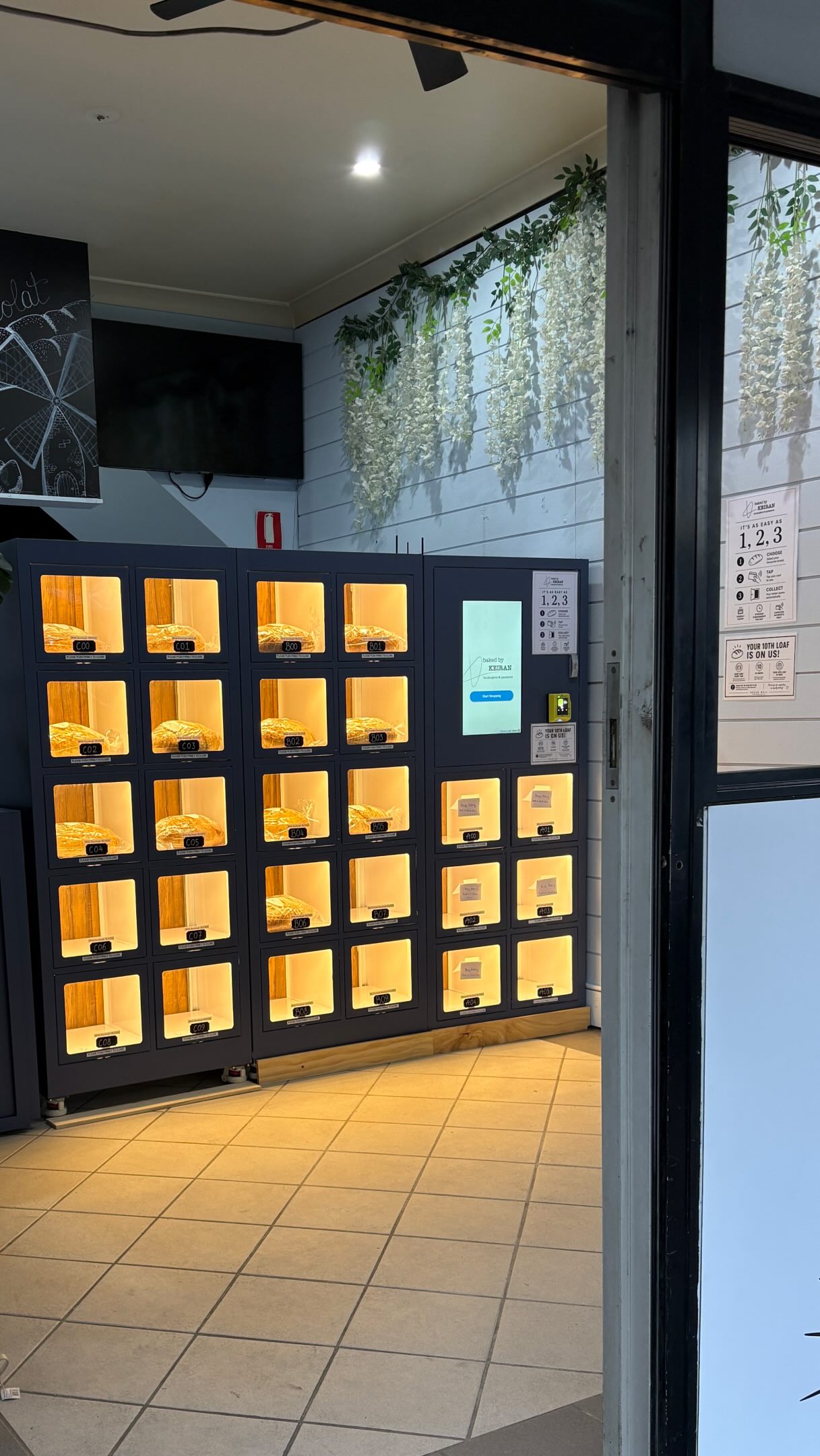
The same pattern of ordering at the front and refilling from the kitchen side can suit cafés, sandwich and ready-meal outlets, and takeaway kitchens that stage prepaid orders.
Frequently asked questions
What is a self-order kiosk?
A self-order kiosk is a touchscreen terminal that lets a customer browse the menu, customise items, pay and send the order to the kitchen without a cashier. In a restaurant it sits between the customer and the point-of-sale (POS) system: it reads the menu, prices and availability from the POS and posts the paid order back so it reaches the kitchen display or printer like any counter order.
How do self-order kiosks work with a restaurant POS?
The kiosk software pulls the menu, modifiers, prices and stock-outs from the POS through the POS vendor’s API, and posts each paid order back to the POS, which routes it to the kitchen display or printer and records the sale. Some POS platforms open their ordering API to any developer; others restrict it to approved partners. Confirm API access with your POS vendor before you choose kiosk hardware.
Do self-order kiosks increase average ticket size?
Often claimed, not guaranteed. Most published uplift figures come from kiosk and POS vendors. A 2021 field experiment in a quick-service restaurant, published in the Journal of Hospitality and Tourism Technology, found customers rated the kiosk experience higher than ordering at a cashier, but cashiers generated more sales revenue, especially at peak times. Measure your own before-and-after ticket and throughput data in a pilot.
Do restaurant kiosks have to be ADA compliant?
The 2010 ADA Standards have no specific technical section for ordering kiosks; section 707 covers ATMs and fare machines. But the Department of Justice has stated that businesses must still provide effective communication for services offered through kiosks, and courts have ruled against inaccessible check-in kiosks. Design to the 308 reach ranges and specify speech output, a tactile keypad and a headphone jack. This is not legal advice.
What payment hardware does a self-order kiosk need?
A card terminal approved for unattended use, normally EMV chip and contactless with mobile wallet support, connected to your acquirer. The PCI Security Standards Council lists unattended payment terminals as a device category under its PTS POI standard. Using a validated terminal that encrypts card data keeps card numbers out of the kiosk software and reduces your PCI DSS scope.
Countertop, floor-standing or wall-mounted: which kiosk should a restaurant choose?
Floor-standing kiosks suit high-traffic lobbies and are the easiest to make reachable from a wheelchair. Countertop units save floor space in small stores and cafes but put the screen higher, so check reach ranges. Wall-mounted units free the floor entirely but need a structural wall, cable routing and correct mounting height. Most multi-kiosk sites mix types.
Does KioskForce make restaurant self-order kiosks?
Yes, to specification. We design the enclosure, screen, payment hardware and Android software, and integrate with your POS as a project-scoped REST API integration. We do not hold certified integrations with named POS vendors. We sell direct and, in some regions, through local distributors. On-site installation is optional and is done by your contractor or, in some regions, the local distributor.
Related reading
- Kiosks: the K180-6C standard kiosk and what we build.
- Self-checkout kiosks: barcode, scan-and-go, RFID and controlled-dispense checkout compared.
- Kiosk cost and kiosk software.
- Payment kiosks and payments on KioskForce machines.
- Kiosk vending machines: when the kiosk should hand over the product too.
- Robotic kiosks: robotic-arm picking for food and retail.
- Robotic coffee kiosks: the real ROI.
- How to vet a manufacturer and shipping and landed cost.
Get started
Tell us your menu complexity, your POS, how many ordering points you need at peak, and whether the kiosk should also hand over the order. We’ll come back with a form factor, payment option and integration scope.
Project brief · 60 seconds
What are we building together?
Three quick steps. Your brief goes straight to the engineers who design, build and support KioskForce systems.

