
What a vending machine shopping cart does
On a keypad vending machine, every product is its own sale. The customer keys in a selection, pays, waits for the item, then starts again for the next one. Five items means five payments.
A touchscreen machine with a shopping cart works like a checkout. The customer browses products with pictures and prices, adds several to the cart, reviews the order, and pays once for the total. The machine then dispenses everything in the order.
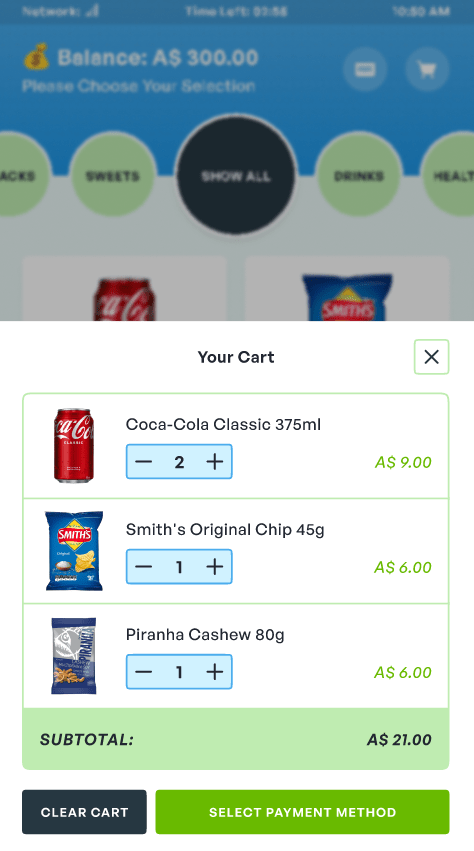
Every KioskForce touchscreen vending machine has the cart, including the budget models. We treat it as a basic function of a touchscreen machine, not a premium add-on.
How the cart works, step by step
- The customer selects a product. It goes into the cart, and the screen shows the running total.
- The machine waits a few seconds for another selection. Each further selection is added to the cart.
- Checkout. If no further selection is made, the machine moves to the payment screen. The customer can also tap Checkout at any point.
- One payment for the order. The total is paid through the payment method the machine is set up with, such as an on-screen QR wallet or a card terminal.
- Dispense. The machine vends each item in the order.
- One order record. The machine sends the order to the cloud dashboard: each item, the quantity, the machine, the time and the receipt ID.
The machine’s default home screen can be either the product selection page or a code-input page. The cart applies to the product selection page.
Why the cart matters to an operator
Lower payment fees
Most card processors charge a flat fee for every transaction plus a percentage of the amount. The percentage doesn’t change whether a customer buys in one payment or five, but the flat fee does.
A worked example, with a fee of USD 0.30 plus 1.75% per transaction:
| Five separate USD 1 sales | One cart of five USD 1 items | |
|---|---|---|
| Flat fees | 5 × USD 0.30 = USD 1.50 | 1 × USD 0.30 = USD 0.30 |
| Percentage fees | 1.75% of USD 5 = USD 0.09 | 1.75% of USD 5 = USD 0.09 |
| Total fees | USD 1.59 | USD 0.39 |
That is about 75% less in fees on the same USD 5 of sales. The example is illustrative; use your own processor’s rates. The lower the item price, the bigger the share of each sale that goes on the flat fee, so the cart matters most for low-priced products such as drinks and snacks.
Higher spend per visit
Average ticket size is the amount a customer spends per transaction. When adding a second or third item takes a tap instead of a new payment, customers buy more per visit: a drink with a snack, or a charger with a cable.
A faster queue
One payment for several items takes less time at the machine than several payments, one after another. That matters at break times, in staff rooms, and anywhere a short queue forms.
Item-level sales data on card sales
A card terminal reports only the amount it charged, not what was bought. On a KioskForce machine the order record comes from the machine’s own telemetry, so the dashboard shows each item and quantity in the cart, even when the customer paid for the whole order with one card transaction. See payment methods for how this works with each payment device.
When the cart is switched off: instant-purchase mode
Some machines dispense through an elevator, which carries each item down to the delivery port instead of letting it drop. That is gentler on fragile products than a free drop. On these machines a drop sensor confirms that each item arrived.
To keep that check reliable, the cart is disabled on elevator machines and the machine runs in instant-purchase mode: the customer chooses one product and goes straight to payment. The setting is in the machine’s admin system as Instant Purchase (Disable Shopping Cart); see the vending machine user manual.
This trade-off is worth knowing before you choose a configuration. If multi-item orders matter more than elevator delivery for your product range, say so when you specify the machine. Our dispense reliability page explains how each dispensing method confirms a vend, and work-order kitting covers how instant-purchase mode affects how a kit of parts is issued.
Which machines have the cart
| Machine | Screen | Cart |
|---|---|---|
| BG10X10 | 10-inch sidecar touchscreen | Yes |
| KF6X10 | Flush 10-inch touchscreen, 616 mm wide cabinet | Yes |
| KF10X22 | 22-inch touchscreen | Yes |
| Wall-mount and compact touchscreen units | Small touchscreen | Yes |
| Keypad-only machines | No touchscreen | No: one selection per sale |
| Any machine running with an elevator | Touchscreen | Off: instant-purchase mode |
A 10-inch screen handles browsing, a cart and payment as well as a 22-inch one. Screen size matters mainly for advertising, not for the cart. See touch screen vending machines for the full comparison.
Features that work alongside the cart
- Discount pricing: show an original and a sale price per product, with the original struck through.
- Nutrition information: a tap opens calories, allergens and ingredients before the customer adds an item.
- Payment methods: on-screen QR wallets, MDB cashless terminals, and account or badge login.
- Remote settings: change prices and settings from the dashboard instead of at the machine.
Questions to ask any supplier about a vending machine cart
- Is the cart standard on every touchscreen model, or an extra?
- Does the cart work with the payment device I plan to use, and is the cart total one authorisation?
- How long does the machine wait for another selection, and can that be changed?
- If one item in a cart fails to vend, what happens to the payment for that item?
- Does the sales report show each item in the cart, or only the payment amount?
- Is the cart disabled on any dispensing configuration, such as an elevator, and why?
We’ll answer all six for the machine and payment setup you’re considering. Send us your product list and preferred payment method.
Project brief · 60 seconds
What are we building together?
Three quick steps. Your brief goes straight to the engineers who design, build and support KioskForce systems.

